
Add Event Affiliate
📣 Invite Someone to Become Your Affiliate
Use the simple form below to invite people to join your affiliate program. They’ll receive an email with everything they need to get started.
How It Works
-
Enter your potential affiliate’s email address
Just type it in the field below and click Send Invitation. -
We’ll send them a branded invitation email.
The email includes:-
A warm welcome from you (your store name will be inserted automatically)
-
A direct link to our Affiliate Registration page
-
Clear instructions on how to sign up, get their unique tracking links, and start promoting your events
-
-
They sign up (and you get a new affiliate!)
Once they register and are approved, they can generate affiliate links for your event pages and start earning commissions.
Tips for Success
-
Encourage your recruits – Let them know why promoting your events is a great opportunity.
-
Follow up – After sending the invitation, a quick personal message can go a long way.
-
Check approvals – New affiliates are approved manually by the site admin, usually within 24 hours. If you’re waiting longer, just let us know.
📝 How to Set Affiliate Commissions for Your Products
Follow these steps every time you add or edit a product. The commission you set here will be paid to your own affiliates (the people you invite) when they sell that item.
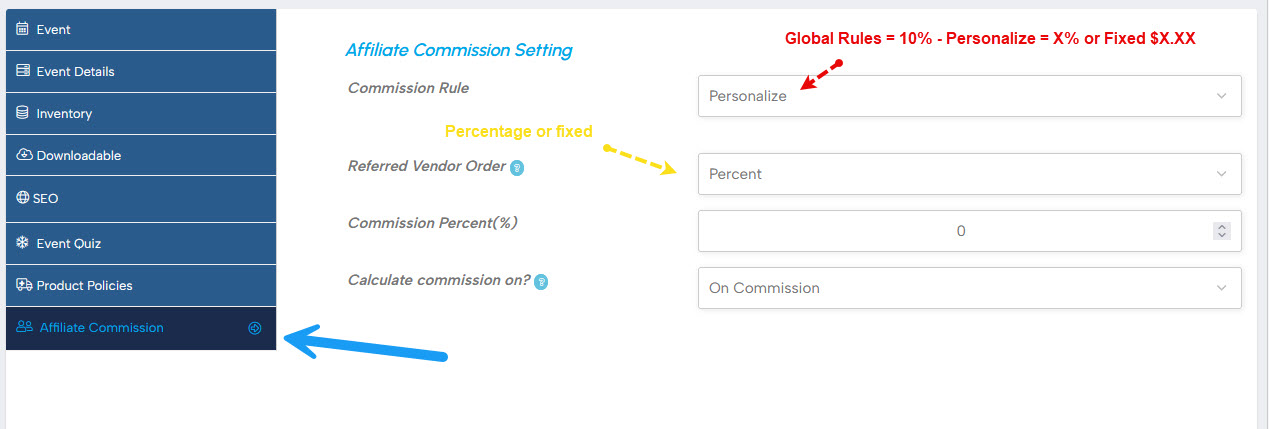
-
Go to your Dashboard → Products
Click Edit an existing product. -
Open the “Affiliate Commission” tab
You’ll find it in the left‑hand menu of the product editor (between Product Policies and Personalize). -
Choose “Personalize” as the Commission Rule
-
Look for the dropdown labelled Commission Rule at the top.
-
Change it from “By Global Rules” to “Personalize”.
-
-
Set your commission under “Referred Vendor Order”
This section controls payments to your own affiliates.-
First dropdown: Choose how you want to pay:
-
Percent – your affiliate gets a percentage of your earnings from this sale.
-
Fixed – your affiliate gets a specific dollar amount per sale.
-
-
Next field: Enter your number.
-
If you chose Percent, type the percentage (e.g.,
5for 5%). -
If you chose Fixed, type the dollar amount (e.g.,
5for $5.00).
-
-
Leave “Calculate commission on?” as “On Commission” – this is already set correctly for our marketplace.
-
-
Ignore everything else
The “Other Orders” section below is for site‑wide affiliates and does not affect your program. You don’t need to touch it. -
Save your product
Scroll up or down and click Submit or Update to save your changes.
💡 Real‑World Example
Let’s say your event ticket sells for $100.
-
The site takes a 10% platform fee → $10
-
Your earnings before paying an affiliate → $90
| If you set… | Your affiliate earns… | You keep… |
|---|---|---|
| 5% (Percent) | $90 × 5% = $4.50 | $90 – $4.50 = $85.50 |
| $5 (Fixed) | $5.00 | $90 – $5 = $85.00 |
The commission always comes out of your share, never the platform’s fee.
✅ Quick Tips
-
Percentage is great if your product prices vary – it keeps commissions fair.
-
Fixed amount works well if all your products have the same price.
-
You can change the commission anytime by editing the product again.