

Download Our Check-in App
Turn any phone into a powerful check-in station. No expensive rentals needed. Just scan and go!

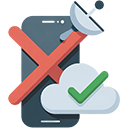
100% Offline Functionality
No Wi-Fi? No problem. Our app works offline, caches attendee lists, and syncs data automatically when you're back online.

Blazing Fast Scan Speed
Validate tickets in under 2 seconds with instant visual and audio feedback. Keep lines moving fast with high-volume scanning.

Real-Time Capacity Tracking
Watch attendance climb live as your team scans. Know the moment you hit capacity and make informed entry decisions instantly.
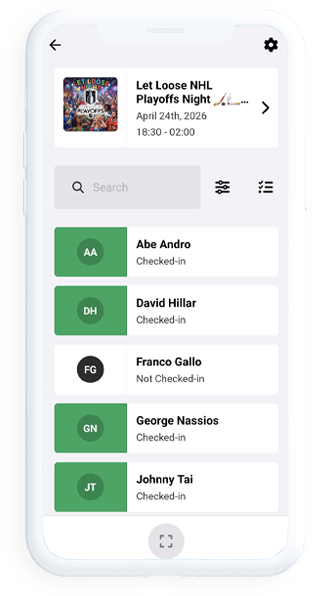

Introduction: Your Most Powerful Event Tool is Already in Your Pocket
The moment your guests arrive sets the tone for everything that follows. A long, disorganized line can sour the excitement before the music even starts or the first speaker takes the stage. Conversely, a fast, friendly, and efficient entry process builds immediate goodwill and signals that you are a pro who has every detail covered.
At The Local Ticket, we believe that technology should simplify your life, not complicate it. That is why we built our Mobile Check-in feature to turn the device already in your pocket—your smartphone or tablet—into a powerful, professional-grade gate management system.
Forget renting expensive scanners, printing reams of paper guest lists, or squinting at blurry printouts in the dark. Our free mobile app puts the entire check-in process in the palm of your hand, allowing you and your staff to process guests in seconds, maintain total control, and focus on what really matters: hosting an amazing event.
Ditch the clipboards and the chaos. Greet your guests with a smile and a scan using The Local Ticket's free, powerful mobile check-in app. ✨
Key Features of The Local Ticket Mobile Check-in App







Setting Up Your Mobile Check-in: A Simple 3-Step Process
Sell Tickets
Set up your event and start selling tickets on The Local Ticket platform. Every ticket sold automatically becomes a scannable QR code.
Download the App
Have your door staff download The Local Ticket Organizer App from the Apple App Store or Google Play Store. (It's free, forever).
Load and Scan
On the day of the event, open the app, select your event, and load the attendee list (do this while you have internet). Then, start scanning!
Conclusion: Take Control of Your Door
Your event is the culmination of weeks or months of hard work. Don't let the front door be the place where that hard work gets derailed. The Local Ticket's Mobile Check-in feature puts you back in control.
It replaces stress with simplicity, chaos with calm, and guesswork with hard data. Best of all, the app is completely free, putting enterprise-level entry management tools into the hands of every local organizer.
Download the app, sell your tickets through The Local Ticket, and experience the joy of a line that never stops moving.
Frequently Asked Questions ❓
Q: Do I need an expensive, special scanner to use this?
A: No! The Local Ticket Organizer App uses the standard camera on any modern smartphone or tablet (iOS or Android). If your device can take a picture, it can scan tickets.
Q: What happens if my staff member's phone dies during the event?
A: If one device dies, you have options. You can have another staff member log in on their phone and continue scanning. Because data syncs in real-time (once online), the new device will know which tickets have already been scanned. It's always a good idea to have two staff members with the app for redundancy.
Q: Can I use the app for multiple events at the same time?
A: Yes, the app allows you to switch between different events you are hosting. You simply select the active event from a dropdown menu within the app.
Q: How do I know if a ticket has already been scanned?
A: When a guest presents a QR code that has already been used, the app screen will flash red and display a "Ticket Already Redeemed" alert. This immediately alerts you to a potential issue.
Q: Is the app really free?
A: Yes, the Organizer App is completely free to download and use. You only pay a small service fee on tickets sold through our platform; the tool to check them in is our gift to you.